


TimeCoach Study Timer for Adults – Distraction-Free Countdown for Writers and Coders
TimeCoach Study Timer for Adults – Distraction-Free Countdown for Writers and Coders
Couldn't load pickup availability
Why you'll love it
- 3-button simple interface lets young children operate the timer independently without adult help
- Large 2.6-inch display is readable from across a classroom or room, reducing disruption during timed activities
- Triple mounting options (magnetic back, retractable stand, hanging hook) adapt to any surface in classroom or home
- Memory function eliminates repetitive setup, making repeat classroom routines faster for teachers
- Multi-pack and color-coordinated options let schools or families equip multiple stations at a lower per-unit cost
- Bright colorways (Blue/Green, Pink/White, Pink/Purple, Orange/Purple) make timers easy to locate in busy rooms
Perfect for
- Classroom activity timing and rotation management
- Homework and study session timeboxing for kids
- Interval timing for workouts, plank holds, and gym circuits
- Reading time and screen-time limit enforcement for children
- Game timer for board games, puzzles, and after-school activities

AOUCE DIGITAL TIMERS
As long as we can make good use of time, we always have time enough!

We are a passionate team of young people who love solving problems and making people's lives better.
Because we were always frustrated with the ones on the market. They were either too complicated or too unreliable. So we teamed up with designers and engineers to make something that was both simple and durable, that's why our timer came from.
We believe time is precious and we want to help our customers save as much time as possible!

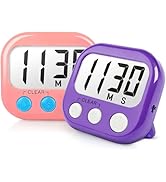
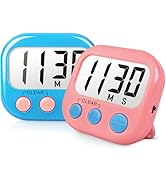

Classroom Timer for Kids

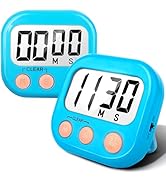

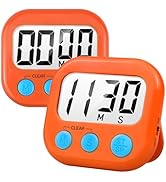
Kitchen Timer for Cooking



Kids Timers for Homework


Product Information
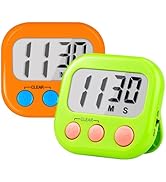
1 Blue & 1 Green digital timers large display and 3 buttones, super easy to read and set up. (Battery Not Included)
Maximum time is 99 minutes 59 seconds, meet the need of classroom and after-school activity perfectly, great countup / countdown timer for teachers kids.
Classroom timer with Strong Magnetic back 2.0 retractable stand and hook for hanging, can be positioned in variety of locations, like table, blackboard, dry erase board and wall hooks.
Memory Setting: You do not need to set the countdown time every time, it will remeber your last time and you only need to press "ST/SP" button.
Click "Add to Your Cart" get these Perfect teachers & children timer for shower, homework, exercise, gym workout, games and reading.
Number of Packs: 2
Number of Items: 2
Included Components: Classroom Timers
Item Type Name: Classroom Timers for Teachers Kids Large Magnetic Digital Timer 2 pack
Color: Blue Green
Material Type: Acrylonitrile Butadiene Styrene
Number of settings: 1
Item Dimensions D x W x H: 0.75"D x 2.8"W x 2.6"H
Item Weight: 3.84 ounces
Screen Size: 2.6 inches
Frequently Asked Questions
Does the large 2.6-inch display help me stay focused without straining my eyes?
Yes. The oversized digits are readable at a glance from your desk, couch, or treadmill, so you can check your remaining focus block without breaking concentration or interrupting your flow state.
Can I use the memory function to repeat my daily Pomodoro cycle?
Absolutely. The memory setting recalls your last countdown automatically, so a standard 25-minute work / 5-minute break cycle can be restarted with a single button press between sessions.
Is the countdown range long enough for a full deep-work block?
Yes. The timer runs up to 99 minutes and 59 seconds, covering everything from a 15-minute writing sprint to a 90-minute deep-work block without needing to reset mid-session.
Will the magnetic back stick to my standing desk frame?
The strong magnetic back attaches to any steel surface, including many standing desk frames, filing cabinets, and whiteboards, keeping your countdown visible without taking up desk space.
Does the 3-button layout help me avoid menu confusion during work?
Yes. The minimalist Start / Stop / Reset layout means there is no menu navigation or app login — you press one button and the timer begins, which keeps your focus on the work, not the tool.
Is this a good timer for a writer working from a home office?
Yes. Writers, coders, and consultants use the TimeCoach to time-box drafting, editing, and research sessions, and the silent, single-purpose design keeps the home office free of phone distractions.
Can I use it as a quiet background cue for meditation or focused reading?
Yes. Set a 10- or 20-minute countdown and place the timer in your peripheral vision — the gentle beep at the end marks the close of your session without disrupting a calm environment.
Will the 2-pack let me run back-to-back focus blocks?
Yes. Many productivity users assign one timer to deep work and the second to breaks, so they can alternate Pomodoro cycles without ever waiting for a single device to reset.
How does this compare to a phone-based Pomodoro app?
Unlike a phone app, the TimeCoach removes notifications, social media, and the temptation to switch tasks, so your productivity timer is also a focus tool by design.
Is the TimeCoach better than a mechanical kitchen timer for work sprints?
Compared to a wind-up mechanical timer, the TimeCoach offers a precise LCD readout, a memory function, and a 99-minute range — all without the ticking noise that can break concentration.
How does this compare to a smartwatch countdown for productivity?
A smartwatch is multi-purpose and pulls in texts, calls, and alerts, while the TimeCoach is single-purpose and silent by design, making it a cleaner tool for deliberate focus work.
I'm worried the beep will disrupt my partner on a video call — is it loud?
The beep is clear and audible in a home office but brief in duration, so it signals your session end without producing a long, jarring tone that would interrupt a nearby call.
Will I actually use the memory function, or is it a gimmick?
Customers who run the same daily routine — study blocks, writing sprints, or workout circuits — find the memory feature is the most-used part of the timer because it removes a step from every single session.
How do I set the countdown on the TimeCoach digital timer?
Press the Mode button to choose countdown or countup, use the up/down buttons to set minutes and seconds up to 99:59, and press Start. The last countdown duration is saved in memory for the next use.
How do I switch between countdown and countup mode?
Press and hold the Mode button for two seconds to toggle between countdown (timer counts down from your set time) and countup (stopwatch that counts up from zero). The display will show the active mode clearly.
How do I reset the timer to zero mid-session?
Press the Stop button to pause the current session, then press the Reset button to return the display to 00:00 (countup) or your last saved countdown time. You can then start a new session immediately.
Will the magnetic back stick to a stainless steel refrigerator?
Yes. The strong neodymium magnetic back attaches securely to most stainless steel refrigerators, freezers, filing cabinets, lockers, and whiteboards. It is not designed for aluminum or glass surfaces.
Does this timer work with a standard classroom whiteboard?
Yes. The magnetic back adheres to any magnetic-receptive whiteboard. If your whiteboard is non-magnetic, use the retractable kickstand for a desk placement or the integrated hanging hook to suspend it from a rail or pin.
What is included in the box when I order a TimeCoach timer?
Each box includes the TimeCoach digital timer unit and a quick-start guide. Batteries are not included — the timer runs on a single AAA battery, which is widely available at any grocery, drug, or office supply store.
Is the TimeCoach timer safe to leave on overnight in a child's room?
Yes. The timer is battery-powered with no cords, no open flame, and no hot surface, so it can safely sit on a nightstand or shelf overnight. The LCD display uses very little power and the unit does not run warm.
How long does the battery last with regular daily use?
A single AAA battery typically lasts several months of regular classroom or home use because the LCD draws minimal power. Many teachers and families replace the battery only two to three times per year.
What is the difference between a digital kitchen timer and a classroom timer?
A standard kitchen timer usually maxes out at 60 minutes with a small dial, while a classroom timer like the TimeCoach offers a 99-minute 59-second range, a large readable LCD, a memory function, and multiple mounting options suited to a busy learning environment.


