


SUPVAN E11 Restrained Label Maker for Scandinavian Home Aesthetic, Uncluttered Bluetooth Thermal Printer for Calm Spaces
SUPVAN E11 Restrained Label Maker for Scandinavian Home Aesthetic, Uncluttered Bluetooth Thermal Printer for Calm Spaces
Couldn't load pickup availability
Why you'll love it
- Dual keyboard + Bluetooth app means quick prints without a phone and creative designs when wanted
- Rechargeable 1200 mAh battery lasts up to a month, eliminating constant battery purchases
- Thermal printing removes the need for ink, toner, or ribbons — lower long-term cost
- 0.2" minimal margin saves tape material so rolls last significantly longer than competitors
- Ultra-portable at 0.5 lb fits in a bag for labeling on-site or at pop-up events
- Free in-app library of 30+ fonts, 50+ frames, and 660+ icons means no paid subscriptions
Perfect for
- Labeling pantry jars, spice containers, and food storage
- Organizing garage tools, hardware bins, and seasonal decor
- Printing file labels and folder tabs in an office
- Naming kids' school supplies, cubbies, and lunch containers
- Pricing merchandise and tagging inventory for a small shop or Etsy seller
Two Way to Print Label

Label with Your Unique Customized Label

Various Label Tapes And Applications

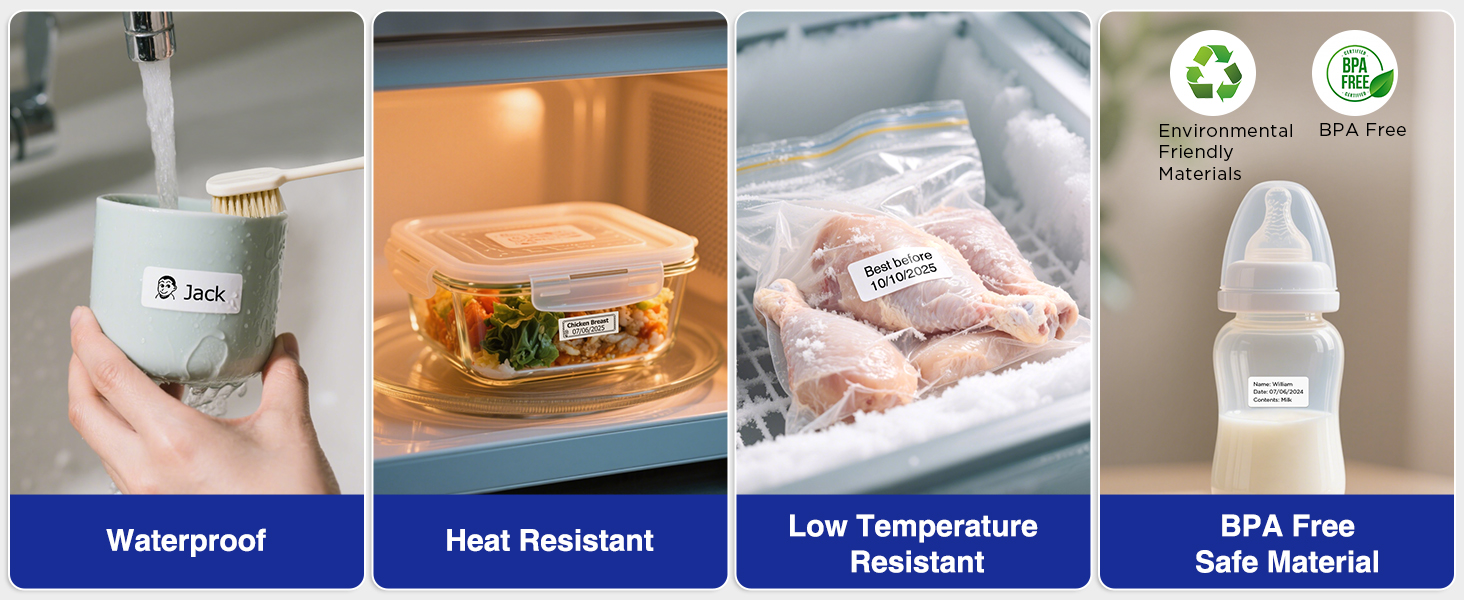
Laminated Label Paper
Packaging List

Please Note: Includes 4 rolls —— 1 stored in the rear compartment, 1 loaded in the label maker, and 2 individually packaged.
Product Information
Fast Keyboard & Smart App Printing: Print directly via the keyboard for quick frequent labeling, or use the App via Bluetooth connection to create customized designs; ideal for home organization, garage tools, pantry items, office files, and school supplies
Portable with Rechargeable Battery: Features with 1200 mAh battery provides up to 1 month of use per charge, offering great cost efficiency; lightweight (0.5 lb) and compact (5.7" x 2.9" x 1.3"), ideal for on-the-go labeling
Minimal Margin Printing: Prints labels with only 0.2" margin — just 1/5 the size of others; saves material while improving label efficiency
Versatile App Editing Function: Easily customize your labels with 30+ fonts, 50+ frames, and 660+ icons; built-in system with 17 languages (e.g., Spanish & French); create and save your own template locally; all free to use
Wide Label Compatibility: Works with continuous labels and die-cut labels; ideal for long content and batch printing
Brand: SUPVAN
Printer Type: Thermal
Other Special Features of the Product: Portable
Printer Output Type: Monochrome
Item Weight: 8 ounces
Item Dimensions D x W x H: 5.8"D x 3.1"W x 1.5"H
Controller Type: Hand Control
Print media: Labels
Compatible Devices: Smartphones
Warranty Type: Limited
Ink Color: black
Additional Printer Functions: Print Only
Control Method: App, Push Button
Display Type: LCD
Resolution: 203 dpi
Color Pages per Minute: 1
B&W Pages per Minute: 28
Color: Black
Printer Connectivity Type: Bluetooth
Hardware Interface: USB Type C
Total Usb Ports: 1
Duplex: Manual
Brand: SUPVAN
Model Name: E11
Built-In Media: Manual, USB-C Cable, White Continuous Label Tape 15 mm x 6 m x 2, White Die-cut Label Tape 12 mm x 40 mm x 2, E11 Label Maker
Series Number: 11
Model Series: E
Specific Uses For Product: Home, Office, School
Item Type Name: Thermal Printer
Maximum Media Size: 15 mm x 6 m
Maximum Sheet Capacity: 1
Maximum print Resolution Color: 203 dpi
Maximum Print Resolution Black and White: 203 dots_per_inch
Wattage: 10 watts
Maximum Copy Resolution Black and White: 203 dpi
Frequently Asked Questions
Will the device itself look out of place in a clean, neutral home?
It is designed with a slim 5.7 x 2.9 x 1.3 inch body and a soft white finish, so it blends in on a pantry shelf, a closet drawer, or a styled desk without breaking the visual calm.
Can I print simple text labels without a lot of design clutter?
Yes. The standalone keyboard mode lets you type plain text and print immediately, which is perfect for a minimalist look that values restraint over decoration.
Does the thermal print style match a less-is-more aesthetic?
Yes, thermal printing produces crisp monochrome labels with no glossy ink, so the finished labels look clean and intentional on glass jars, ceramic canisters, and woven baskets.
Will the 0.2-inch print margin help me keep tape waste out of the trash?
Yes, the 0.2-inch margin cuts off almost all the wasted tape, which means fewer empty strips piling up and a more sustainable, clutter-light approach to labeling.
Is the device small enough to store out of sight in a minimalist home?
At 0.5 lb and about the size of a TV remote, it slips into a drawer, a basket, or a pantry bin and is easy to grab when you need it.
Is this a good fit for someone who follows a capsule wardrobe or capsule kitchen lifestyle?
It is. You can label uniform storage bins, matching containers, and minimal hangers so every category has a place, which is the heart of the capsule approach.
Will it help me achieve a clean pantry aesthetic on Instagram?
Yes, you can print matching monochrome labels across all your jars, which creates the consistent, intentional look that defines curated pantry photos.
Is it right for someone who wants fewer devices, not more?
It replaces multiple tools at once. The keyboard, app, and printer are in one unit, so you do not need a separate computer, label sheet, or ink setup.
Can it support a simple, no-subscription approach to home organization?
Yes, the free in-app library of 30+ fonts, 50+ frames, and 660+ icons is included at no cost, so you can design every label without paying for extras.
Is it appropriate for a quiet, intentional living space?
It is. The thermal print is nearly silent, there is no ink smell, and the rechargeable battery means no disposable batteries cluttering your drawers.
How is it different from a color inkjet label printer?
A color inkjet printer is bulkier, needs cartridges, and often requires a computer. This thermal model is smaller, ink-free, and designed for clean monochrome labels that suit a minimalist style.
Is it less visually noisy than a big desktop label maker?
Yes, the compact body and understated controls feel at home on a styled shelf, where a large industrial label maker would look out of place.
How does it compare to handwritten labels for a minimalist look?
Handwritten labels are charming but inconsistent. This device gives you the same clean, uniform typography across every jar and bin, which is the hallmark of a minimalist space.
I worry the device will add visual clutter to my counter.
Because it weighs 0.5 lb and has a slim profile, most people store it in a drawer between uses and only bring it out when labeling, so it never becomes counter clutter.
What if I want simple labels but the app feels overwhelming?
You never have to open the app. The keyboard handles basic text labels on its own, which keeps the experience as minimal as the result.
I am not sure I need icons or frames, are they worth the cost?
The icons and frames are included free, so you can ignore them and stick to plain text. You pay nothing extra for a design library you may not use.
How do I set up the label maker the first time I open the box?
Insert one of the included tape rolls, press and hold the power button to turn the device on, and you can start typing on the QWERTY keyboard right away. To use the Bluetooth app, download the free companion app, pair your phone, and follow the on-screen steps to sync.
How do I switch between continuous label rolls and pre-cut die-cut labels?
Open the tape compartment, swap in the roll type you want to use, and the device will automatically recognize the format. You can then choose continuous mode for custom lengths or die-cut mode for ready-made label shapes.
How do I charge the battery and how long does it take?
Connect the included USB-C cable to any standard USB power source, such as a phone charger, laptop, or power bank. A full charge takes a few hours and delivers roughly a month of typical use.
Does it work with my iPhone and Android phone?
Yes, the Bluetooth companion app is compatible with both iOS and Android devices. Pairing is handled through your phone's Bluetooth settings, and the app guides you through the rest.
Will third-party label tapes work with this printer?
The device is designed to work with tapes up to 15 mm wide, including continuous and pre-cut rolls. Most tapes that match this width specification will print correctly, though brand-specific smart chips may not be recognized.
What is included in the box?
The package includes the SUPVAN E11 label maker, a USB-C charging cable, and four starter tape rolls. You can start printing immediately, and additional tapes are sold separately when you need more.
Is thermal printing safe for kitchen and food storage labels?
Yes, thermal labels are commonly used in kitchens and pantries. The print is applied to the outside of containers, so there is no contact with food, and there is no ink, toner, or ribbon involved in the process.
How reliable is the device for long-term daily use?
The thermal print head has no ink to dry out, the rechargeable battery avoids constant battery swaps, and there are no ribbons to replace. With reasonable care, the device is designed for years of regular labeling.
What is the difference between a thermal label maker and an inkjet label printer?
A thermal label maker uses heat to print on special tape, so it needs no ink, toner, or ribbons and is usually smaller and quieter. An inkjet label printer uses liquid ink cartridges, can print in color, but is typically larger, more expensive to maintain, and less portable.


