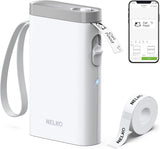
Nelko P21 Mini Thermal Label Printer – Creative Gift for Crafters and Etsy Sellers
Nelko P21 Mini Thermal Label Printer – Creative Gift for Crafters and Etsy Sellers
Couldn't load pickup availability
Why you'll love it
- Pocket-sized portability means labels can be printed anywhere, not just at a desk
- Inkless thermal printing eliminates the recurring cost and hassle of ink or toner cartridges
- Seven color options let buyers match personal style or coordinate with classroom/office aesthetics
- App-based template library (750+ templates, 5500+ materials) removes the learning curve for design
- Bluetooth wireless setup keeps the workspace clutter-free with no cables between phone and printer
- Rechargeable battery via USB-C avoids buying disposable batteries for everyday use
Perfect for
- Labeling student folders, bins, and classroom supplies at the start of the school year
- Organizing pantry jars, freezer containers, and spice bottles in the kitchen
- Creating price tags and inventory labels for a small business or craft shop
- Personalizing kids' school items like lunch boxes, pencil cases, and water bottles
- Tagging office supplies, notebooks, and reminder labels at a workstation


 Product Information
2026 New Version: Compared with traditional label makers, Nelko P21 handheld label maker has half the weight and size, making it smaller, smarter, and ultra-portable. The wireless Bluetooth label maker can slip into your pocket, allowing you to print anytime, anywhere. For great printing results, we recommend using our NELKO thermal label paper. Important Note for iOS Users: Please make sure you have updated your Nelko P21 app to the latest version (V4.8.0) for a great experience
High-quality Printing: The P21 label maker features BPA-Free Direct Thermal Technology. Equipped with high-speed chips and 203 DPI, the P21 label maker delivers high-definition printing without ink or toner, perfect for back to school supplies. The label maker comes with a long-lasting built-in rechargeable battery for extended use. This label maker prints in monochrome (black text only), and you can create color labels by using color pattern label tapes. Note: Charging adapter not included
Easy to Use: NELKO label printer connects with iOS & Android phones via Bluetooth. Step 1: Download "Nelko" app from Google Play or App Store. Step 2: Install paper roll. Step 3: Connect P21 via Bluetooth in the APP. Step 4: Choose a quick template and print. It is not compatible with Google Pixel phones running Android 14. This label maker's APP includes 3600+ icons, 700+ borders, 5500+ materials, 750+ templates, 29 languages. Note: This label maker doesn't work with computers
Multiple Creative Functions & Templates: This app for the label maker provides various features and templates, making it easy to create various designed label stickers in the App with text, QR code, barcode, materials, images, time and borders, etc. The length of labels is fixed, including 14×40mm, 14×50mm, 14×75mm, and more. Please do not tear or damage the green sticker on the back of the label strip, otherwise it will affect the printing effect. Note: Continuous label tapes are not supported
Design Your Own Labels: This label maker machine with tape is widely used at home, in the office, and at school. At home, it helps organize clothes, food storage, cosmetics, and mailings. In the office, it is ideal for notebook tags, price tags, reminder labels, and other office supplies. At school, it supports teachers and students with name tags, item identification, and classroom organization. You can also use it to create unique back-to-school decorations and fun school supplies for kids
Classroom Must Haves: The P21 Bluetooth label maker is one of the classroom must haves and teacher must haves for organizing school supplies efficiently. It serves as a smart mini label maker for classroom teachers to sort books, bins, and student folders, while also being a waterproof label maker for kids' school items like lunch boxes, pencil cases. With its portable design, you can print labels anywhere to keep everything in its place, so your classroom always stays tidy and well-organized
Brand: Nelko
Connectivity Technology: Bluetooth
Printing Technology: Thermal
Special Feature: Home and Office Organization, Name Labels, Price Tags, Reminder Labels, Portable, Clear Printing, Easy to Use, Rechargeable, Wireless, Inkless, Text, QR code, Barcode, Materials, Images, Time and Borders, Thanksgiving, Christmas, School, Students, Teacher Supplies
Printer Output Type: Monochrome
Item Weight: 11.5 ounces
Item Dimensions D x W x H: 6.65"D x 4.5"W x 1.9"H
Controller Type: iOS, Android
Print media: Labels
Scanner Type: Portable
Maximum Copy Speed Black and White: 30 pages_per_minute
Compatible Devices: Smartphones, iPhone, IOS & Android
Ink Color: Black
Additional Printer Functions: Print Only
Control Method: App
Number of Trays: 1
Processor Count: 1
Resolution: 203 x 203 DPI
Maximum Media Size: 14X75mm
Maximum Sheet Capacity: 1
Paper Size: 15X30mm,12X40mm,14x40mm, 14X50mm,14x75mm
Output sheet capacity: 1
Printer Connectivity Type: Bluetooth
Hardware Interface: USB Type C
Brand: Nelko
Model Name: P21
Built-In Media: 1 X P21 label maker, 1 X Roll of white label paper, 1 X Type C charging cord, 1 X User Manual, Setup Guide
Model Series: P21
Specific Uses For Product: Small Business Price, School and Office Files Classification, Home Supplies Organization, Personal Item Identification, Name Tags and Jewelry Tags
Item Type Name: Label maker
Warranty Description: 1 year
B&W Pages per Minute: 30
Color: White
Color Depth: 1
Maximum Print Resolution Black and White: 203 DPI
Duplex: Automatic
Maximum Copy Resolution Black and White: 203 DPI
Frequently Asked Questions
Is the Nelko P21 a good gift for a teacher?
Yes. Teachers consistently use it to label student supplies, classroom bins, and learning centers, and the included starter tape plus seven color options make it feel like a complete, ready-to-use gift.
Would the Nelko P21 make a thoughtful housewarming gift?
Absolutely. New homeowners often need to label pantry items, storage bins, and utility closets, and a portable label maker is a practical, unexpected upgrade from typical housewarming gifts.
Is this a suitable gift for a mom who loves organizing?
Yes. It is a favorite among moms who run organized homes, and the compact, attractive design makes it feel like a personal luxury rather than a utilitarian tool.
Can I give the Nelko P21 as a gift to a small business or Etsy seller?
Definitely. It is widely used for pricing inventory, tagging products, and labeling packaging at craft fairs and home-based shops, making it a useful and appreciated gift for creative entrepreneurs.
Does the Nelko P21 arrive gift-ready out of the box?
It comes with the printer, a starter label tape, and a USB-C charging cable, so it is ready to use as soon as the recipient unboxes it, with no extra accessories required to get started.
How do I set up the Nelko P21 label maker for the first time?
Charge the printer with the included USB-C cable, download the Nelko app on your iOS or Android device, pair via Bluetooth, and select a label template to start printing.
How do I print a label from my phone using the Nelko P21?
Open the Nelko app, choose a template or start a blank label, type your text or add icons and borders, select your tape width, and tap print. The label feeds out in seconds.
How do I change the label tape in the Nelko P21?
Open the side cassette compartment, remove the old tape roll, insert a new compatible Nelko thermal tape in the correct width, close the cover, and the printer is ready to use.
Does the Nelko P21 work with both iPhone and Android phones?
Yes. It connects via Bluetooth to iOS and Android devices through the Nelko app, which supports 29 languages and is regularly updated for compatibility.
What label tape sizes does the Nelko P21 support?
The printer supports 12x40mm, 14x40mm, 14x50mm, and 14x75mm thermal label tapes, giving you flexibility for everything from name tags to wide pantry labels.
What is included in the box with the Nelko P21?
The package includes the Nelko P21 label maker, one starter roll of label tape, a USB-C charging cable, and a quick-start guide. The Nelko app is downloaded separately from the App Store or Google Play.
Is the Nelko P21 safe to use around food and kids?
Yes. It uses BPA-free direct thermal printing with no ink, toner, or chemical cartridges, so there are no fumes or liquid refills to worry about in a kitchen or family space.
How long does the Nelko P21 battery last on a single charge?
The built-in rechargeable battery is designed for extended portable use, and most users can complete multiple labeling sessions before needing to recharge via USB-C.
What is the difference between a thermal label maker and an inkjet label printer?
A thermal label maker like the Nelko P21 uses heat to print on special thermal paper, so it requires no ink or toner cartridges. Inkjet label printers use liquid ink, which can smudge, dry out, and add ongoing supply costs. Thermal printers are typically more compact, quieter, and lower maintenance for everyday labeling tasks.