Logitech MK345 Ergonomic Wireless Combo – Palm Rest Keyboard and Optical Mouse for Focused Workdays, Plug-and-Play Productivity
Logitech MK345 Ergonomic Wireless Combo – Palm Rest Keyboard and Optical Mouse for Focused Workdays, Plug-and-Play Productivity
Couldn't load pickup availability
Why you'll love it
- Set-and-forget convenience with up to 3 years of keyboard battery life and 18 months on the mouse
- Cross-platform compatibility removes the hassle of buying separate peripherals for different computers
- Quiet, familiar full-size typing with a built-in palm rest reduces fatigue during long sessions
- Spill-resistant design protects against everyday accidents in busy home and office settings
- Reliable 2.4 GHz wireless up to 10 meters frees up desk space and reduces cable clutter
- Trusted Logitech brand and plug-and-play simplicity offer low-risk value compared to cheaper no-name brands
Perfect for
- Daily office productivity and typing tasks
- Setting up a new home office workstation
- Replacing aging or wired keyboard and mouse
- Plug-and-play use across Windows, macOS, and ChromeOS computers
- Long-term daily use without frequent battery changes

Full-sized, extra comfort

Comfortable and spill-resistant

Built to keep going

Product Information
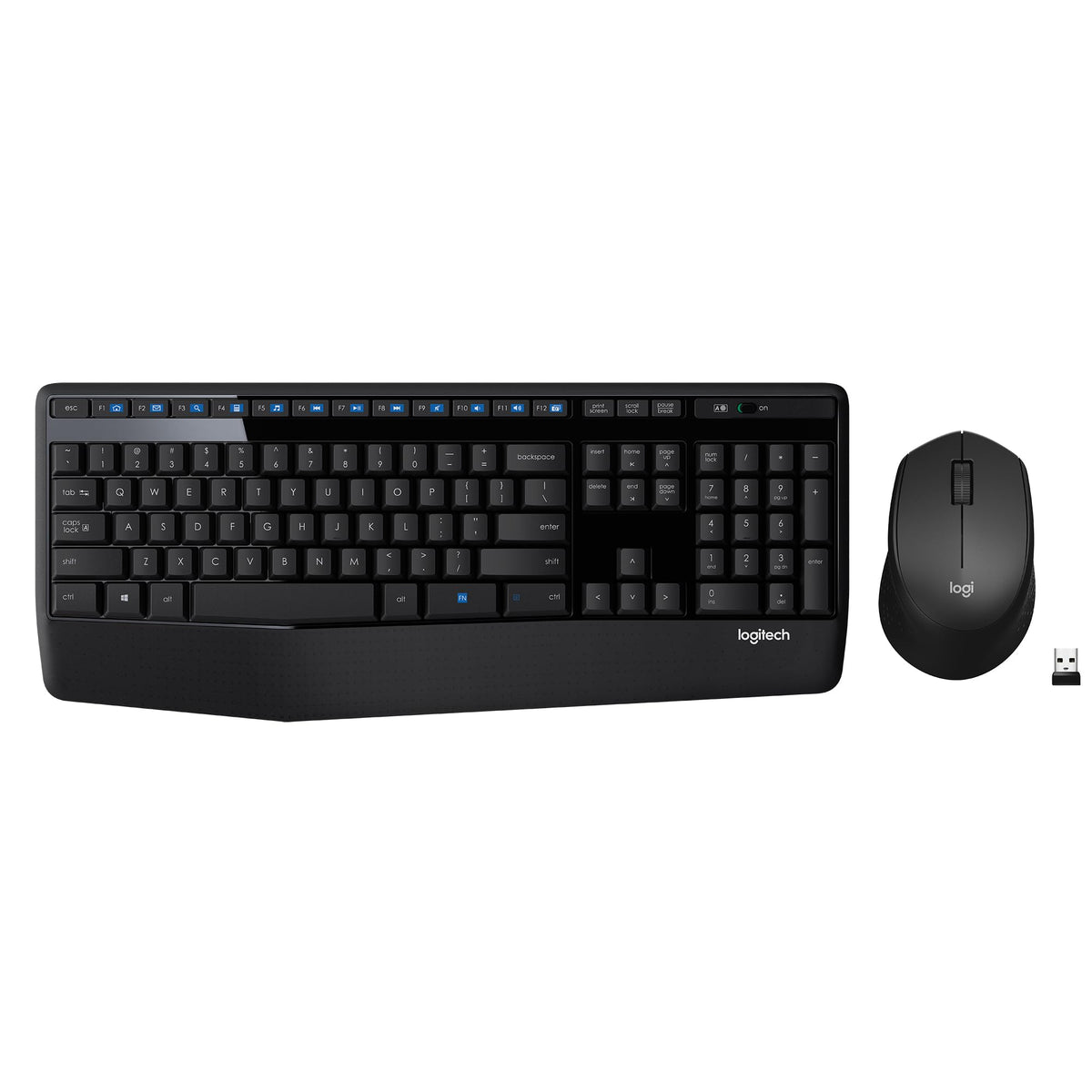
Dependable wireless connection: Enjoy the reliability and convenience of 2.4 GHz connectivity with your logitech wireless keyboard and mouse combo, wireless range up to 10 meters away at home, or work.
Full-Size Wireless Keyboard: Comfortable, quiet typing on a familiar keyboard layout with palm rest, spill-resistant design, and media keys. This wireless keyboard and mouse logitech has easy-access to media keys
Plug and Play: MK345 works seamlessly with Windows, macOS, and ChromeOS. Experience hassle-free setup with the logitech mk345 wireless combo and wireless keyboard mouse combo for various operating systems.
Long-lasting Battery: The MK345 combo offers a full size keyboard battery life of up to 3 years and a mouse battery life of 18 months (1); batteries included
Comfortable Right-handed Mouse: This wireless USB mouse with dongle works well for this wireless mouse and keyboard combo, featuring a contoured shape for all-day comfort and smooth, precise tracking and scrolling for easier navigation.
The Logitech Wireless Combo MK345 is a versatile logitech keyboard and mouse combo featuring a comfortable full-size keyboard with a right-handed mouse. This keyboard and mouse wireless setup offers the reliability of a cord with the freedom of advanced 2.4 GHz wireless connectivity. The Logitech keyboard and mouse wireless combo is an ideal choice for those looking for a wireless keyboard for laptop use or a wireless keyboard and mouse for mac. The usb keyboard and mouse combo provides seamless connectivity. Whether you need a wireless keyboard logitech design for home or office use, this slim keyboard and mouse wireless set works well for various environments. The wireless keyboard and mouse feature quiet operation, making it suitable for focused work settings. On/Off switch functionality enhances battery life, making this logitech mouse and keyboard a practical and efficient choice. This computer keyboard & mouse combos set can be used for different computer systems, offering compatibility and performance. The Logitech Wireless Combo MK345 delivers reliable performance and convenience.Connectivity Technology: wireless
Other Special Features of the Product: Wireless
Compatible Devices: Personal Computer
Movement Detection: Optical
Keyboard Backlighting Color Support: Single Color
Power Source: Battery Powered
Keyboard Layout: QWERTY
Number of Batteries: 2 AA batteries required. (included)
Compatible Operating System Family: Windows
Minimum Required Operating System Version: ChromeOs 134, Windows 10
Hand Orientation: Right
Operating System: Windows 10, 11 or later, Chrome OS
Number of Keys: 104
Color: Black
Item Weight: 500 g
Brand: Logitech
Keyboard Description: QWERTY
Antenna Location: Personal
Number of Packs: 1
Global Trade Identification Number: 00097855107879
Built-In Media: Item
Item Type Name: Logitech Wireless Combo Mk345 Keyboard & Mouse Set, Black (920-006481)
Mfr Part Number: 920-006481
Warranty Description: 1 year limited hardware warranty.
Frequently Asked Questions
Does the Logitech MK345 keyboard support long typing sessions without hand fatigue?
Yes. The MK345 features a full-size 104-key QWERTY layout with an integrated palm rest, providing a familiar typing position that helps reduce wrist strain during extended home office or study sessions.
Will the MK345 wireless combo stay connected reliably during a full workday?
The included 2.4 GHz USB dongle delivers a stable wireless connection with a range of up to 10 meters, so you can type and click without dropouts across most home office layouts.
Do the easy-access media keys help me stay focused on work tasks?
Yes. The MK345 includes dedicated media keys for volume and playback control, letting you manage calls and audio quickly without breaking your workflow.
How long will the batteries last during daily productivity use?
The keyboard is rated for up to 3 years of battery life and the mouse up to 18 months on the included AA batteries, so you can set it up and focus on work without frequent replacements.
Can I leave the MK345 on my desk all day without it draining power?
Yes. Both the keyboard and the mouse have built-in on/off switches, so you can power them down at the end of the day to extend battery life even further.
Is this a good keyboard and mouse combo for setting up a new home office workstation?
Absolutely. The MK345 is a plug-and-play wireless combo with a full-size keyboard, integrated palm rest, and a right-handed optical mouse, making it a complete workstation bundle right out of the box.
Will the MK345 help me replace my old wired keyboard and mouse clutter?
Yes. The 2.4 GHz wireless connection removes the cable clutter from your desk, giving you a cleaner, more focused workspace.
Is the Logitech MK345 good for students who type all day for class?
Yes. The familiar full-size layout, quiet keys, and long battery life make the MK345 a dependable everyday keyboard and mouse for note-taking, essays, and research.
Does the keyboard's spill-resistant design help with busy workdays?
Yes. The spill-resistant construction protects against everyday accidents like coffee splashes, which is helpful in shared home office or dorm environments.
Will the MK345 help me build a more distraction-free work ritual at home?
Yes. The quiet, familiar typing feel, media shortcuts, and cable-free setup all contribute to a calmer, more focused daily work environment.
How does the Logitech MK345 compare to a basic wired keyboard and mouse bundle?
The MK345 adds wireless freedom, a longer battery life, spill resistance, and a built-in palm rest, which most basic wired bundles do not include.
Is the MK345 better than using a laptop keyboard for full-day productivity?
For long typing sessions, a full-size external keyboard like the MK345 with a palm rest is generally more comfortable and ergonomic than typing directly on a laptop.
How does the MK345 compare to Logitech's higher-end MX-series keyboards?
The MK345 is a value-focused combo designed for reliable everyday productivity, while the MX series offers premium features like mechanical switches and multi-device pairing at a higher price point.
Will the mouse's smooth tracking slow me down during detailed office work?
No. The right-handed contoured optical mouse provides smooth, accurate tracking for spreadsheets, documents, and everyday navigation.
What if my work day is interrupted by power outages or moving my laptop around?
The wireless 10 meter range means you can unplug your laptop and move to another room while staying connected, and the on/off switches help preserve battery during downtime.
Is the Logitech MK345 worth it for someone who only works from home part time?
Yes. The long battery life means it will be ready whenever you need it, and the plug-and-play setup makes it easy to start and stop work without hassle.
How do I set up the Logitech MK345 wireless keyboard and mouse?
Simply plug the included USB receiver into an available USB port on your computer, turn on the keyboard and mouse using their on/off switches, and they will connect automatically. No additional software or pairing is required.
How do I replace the batteries in the MK345 keyboard and mouse?
Both devices run on AA batteries. Slide open the battery compartment cover on the bottom of each device, remove the old batteries, and insert new AA batteries following the polarity markings. The included batteries are pre-installed for plug-and-play use.
How do I turn the keyboard and mouse on and off?
Each device has a small on/off switch located on its side or bottom. Slide the switch to the on position during use and to the off position when storing or traveling to maximize battery life.
Does the Logitech MK345 work with Windows 11?
Yes. The MK345 is plug-and-play compatible with Windows 10 and Windows 11 through its 2.4 GHz USB receiver.
Does the Logitech MK345 work with macOS and ChromeOS?
Yes. The MK345 works with macOS and ChromeOS in addition to Windows, making it a flexible option for households that use multiple operating systems.
What is included in the box with the Logitech MK345 combo?
The combo includes the MK345 wireless keyboard, the included wireless mouse, a 2.4 GHz USB receiver, pre-installed AA batteries for both devices, and user documentation. The keyboard-only variant includes the keyboard, USB receiver, batteries, and documentation.
Is the Logitech MK345 safe for everyday home use?
Yes. The MK345 is designed for daily home and office use, with a spill-resistant keyboard construction and standard AA battery power. It is intended for indoor use on a stable surface.
How reliable is the wireless connection on the MK345?
The 2.4 GHz wireless connection provides a stable link with a range of up to 10 meters, which is sufficient for most home office and living room setups.
What is the difference between a wireless keyboard and mouse combo and a Bluetooth keyboard and mouse?
A combo like the MK345 uses a 2.4 GHz USB receiver to connect, which is typically plug-and-play and very reliable. Bluetooth keyboards and mice connect wirelessly without a receiver but often require manual pairing and may have slightly higher latency. The MK345's USB receiver approach is generally easier for mixed-OS households and plug-and-play use.