CATPOWER Laptop Light Bar – Eye-Caring Task Light for Long Screen Sessions, Flicker-Free LED
CATPOWER Laptop Light Bar – Eye-Caring Task Light for Long Screen Sessions, Flicker-Free LED
Couldn't load pickup availability
Why you'll love it
- Flicker-free, eye-caring design reduces fatigue during 8+ hour screen sessions
- Clip-on design saves valuable desk space versus a traditional desk lamp
- USB power means one cable, no extra outlet needed—works with power banks on the go
- Three color temperatures and 10 brightness levels let users tune light to task and time of day
- Weighs only 4.8 oz and is slim enough to slip into a laptop bag for travel
- Sits on top of the monitor so light goes on the desk, not into your eyes or on the screen
Perfect for
- Reducing eye strain during long laptop work sessions in dim rooms
- Late-night reading or studying without disturbing a partner or roommate
- Adding focused task lighting to a cramped hotel or shared workspace while traveling
- Improving visibility during video calls and design work on a laptop screen
- Providing adjustable, glare-free light for e-reading on a laptop or monitor

Choose from various brightness levels and color temperatures and easily adjust the lamp to the desired position. This elegant lamp enhances the ambiance with its stylish lighting design, allowing you to clearly see every detail on your laptop as you work with ease and precision.


3 Color Temperature and 10 Brightness Levels for you to choose
Check out the details

Lightweight and Portable
The CATPOWER LED laptop screen lamp is both lightweight and portable, weighing just 130g and measuring 26cm. And it uses physical buttons.

Saving space
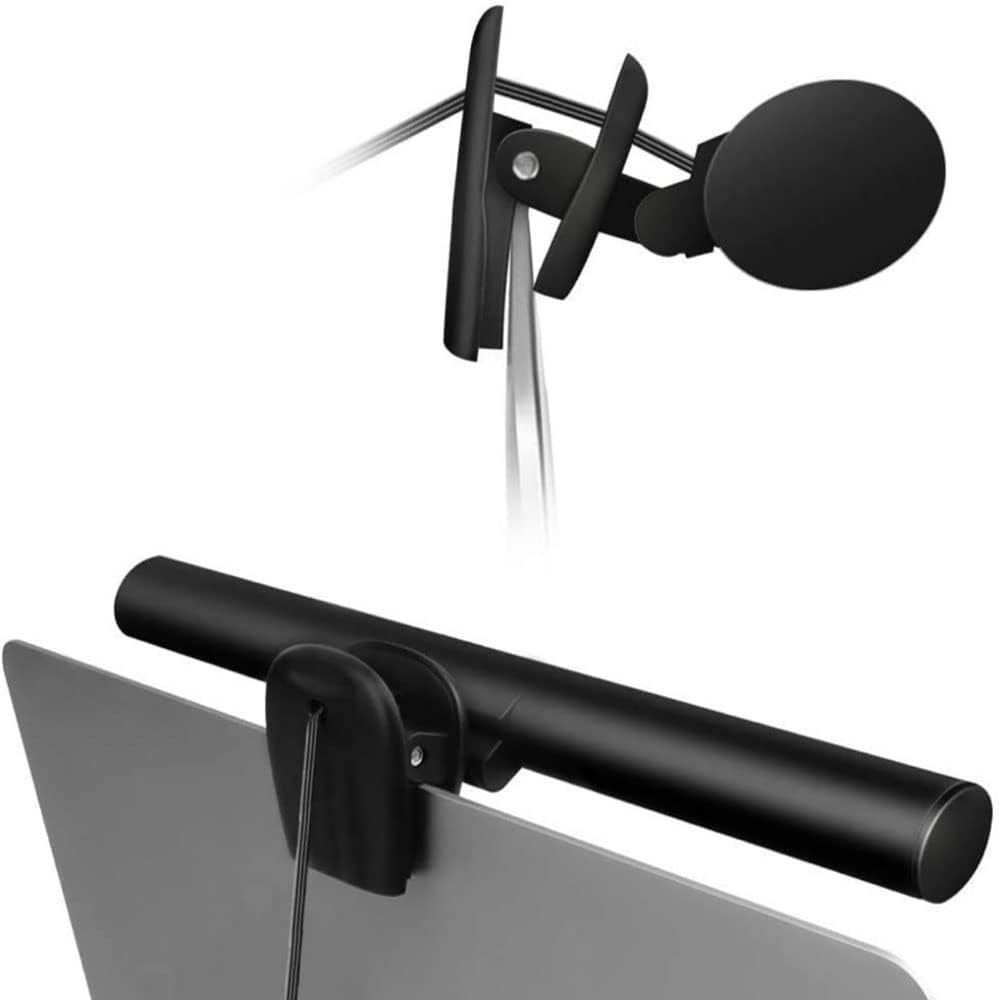
The lamp can be directly clipped on the top of a monitor, saving desk space. Thus, it's highly portable and suitable for use on any place.

Easy installations
The clip can open to a width of 1.5cm, compatible with the majority of laptops. The light bar can be rotated up to 150 degrees. Angle can customize.

Included in the package are:
a 26cm laptop screen lamp,
a black cloth bag,
and a user manual.
RoHS CE FCC
Material: PC+ABS
Color Rendering Index: 80RA
Power: Maximum 5W
Weight: 130g
Product Size : 26cm*2.2cm*1.6cm

Product Information
3 Color Modes & 10 Brightness Levels: This laptop light has 3 color modes (warm light/white light/cool light) and 10 brightness levels to meet your different lighting needs. You can easily adjust the brightness to create the perfect lighting for reading, working, or relaxing. Eye-caring Design: The LED desk lamp adopts a flicker-free design, which reduces eye strain and fatigue caused by prolonged computer use. The soft light is gentle on your eyes, making it ideal for long hours of work or study. USB Power Supply: The laptop light is powered by a USB cable, which makes it convenient to use. You can connect it to your laptop, computer, power bank, or any other USB-enabled device. Flexible & Portable: The LED desk lamp is flexible and portable, allowing you to adjust the lighting angle and position to suit your needs. The slim and lightweight design makes it easy to carry and use in different places, such as your home office, bedroom, or study room. Durable & Reliable: The laptop light is made of high-quality materials, which makes it durable and reliable. The LED beads have a long lifespan, and the lamp is designed to withstand daily wear and tear.
Technical Details Finish Type Painted Base Material Aluminum Bulb Base E10 Product Dimensions 0.8"D x 26"W x 0.8"H Item Weight 0.3 Pounds Lamp Type LED Shade Color black Shade Material Aluminum Switch Type Push Button Style Modern Brand CATPOWER Color Black Special Feature Adjustable Color Temperature, Dimmable, Lightweight, Portable Light Source Type LED Material Acrylonitrile Butadiene Styrene Room Type Bedroom, Classroom, Deck, Living Room, Office Recommended Uses For Product Office, Reading, reading,Work Power Source Corded Electric Shape Cylinder Number of Light Sources 54 Included Components Power Cable Is Waterproof False Mounting Type Desktop Wattage 5 watts Number of Items 1 Lighting Method Adjustable Control Method Touch Indoor/Outdoor Usage Indoor Specific Uses For Product Reading, Reading, traveling, business trips, office work, conference rooms, students, designers,, Computer monitor light bar for office working, reading, studying, painting, design, games, fit for monitor with thickness from 0.3" to 1.4" Water Resistance Level Not Water Resistant Installation Type Clip On Number of Pieces 1 Efficiency Highly Efficient Voltage 5 Volts Is Cordless? No Model Name Smart Screen e-Reading Lamp Product Benefits Reduces eye strain and improves productivity Sensor Technology touch Manufacturer Shenzhen Xusheng Lighting Technology Co., Limited Theme Space Light Color Warm White, White Part Number JD-A1 Item Weight 4.8 ounces Item model number JD-A1 Finish types Painted Special Features Adjustable Color Temperature, Dimmable, Lightweight, Portable Batteries Included? No Batteries Required? No Color Temperature 6500 Kelvin
Frequently Asked Questions
Will the flicker-free LED really reduce eye strain during long laptop sessions?
Yes. The 54-LED flicker-free light bar delivers steady, even illumination, which is one of the most common recommendations for reducing digital eye strain during multi-hour screen use.
Can I use warm light in the evening to wind down without overstimulating my eyes?
Yes. The warm white color mode is designed for low-stimulation evening use, and the 10 brightness levels let you dim it to a candle-soft glow for reading or journaling in bed.
Does the asymmetric design prevent light from shining into my eyes?
Yes. Light is directed down onto the desk and your reading material rather than fanning out into your line of sight, so you are not staring into a bright source during late-night sessions.
Can I read or study in bed at night without waking a partner or roommate?
Yes. The bar focuses light on your keyboard, book, or tablet and avoids spilling across the room, so you can keep a personal lighting bubble even in a shared bedroom.
Will using it help me build a more mindful wind-down routine?
Yes. A consistent, low-glare light source signals to your body that it is time to transition out of work mode, supporting a calmer nightly ritual before sleep.
Is this a good wellness-focused gift for someone who works long hours on a laptop?
Yes. Eye strain, poor sleep, and shared-bedroom light conflicts are common pain points. A monitor light bar addresses all three, making it a thoughtful personal-care upgrade.
Will it help me unwind with a book or journal after work without harsh lighting?
Yes. Set the bar to warm white at low brightness and you get a soft, focused pool of light over your reading material — calmer than an overhead lamp, but bright enough to read by.
Is it gentle enough for sensitive eyes or migraine-prone users?
Yes for most users. The flicker-free LED, asymmetric beam, and dimmable brightness reduce the harsh triggers — direct glare, flicker, and overly bright sources — that often aggravate sensitive eyes.
Can it support a calmer morning routine at my desk?
Yes. Pairing a warm or neutral color temperature with a soft brightness level is a simple way to ease into the day rather than starting with a bright, clinical overhead light.
Will the touch controls feel calm and unobtrusive during a wind-down?
Yes. The touch surface is silent, with no clicks, beeps, or indicator lights, so it integrates smoothly into a quiet personal-care routine.
How does this compare to a salt lamp or ambient bulb for a calming workspace?
Ambient lighting is great for mood but is usually too dim or too scattered for actual screen work. The monitor light bar delivers calm, warm light that is bright enough to read and work by, while still feeling soft and personal.
How does it compare to a traditional bedside reading lamp?
A bedside lamp lights the whole side of the bed and often disturbs a partner. The monitor light bar focuses light on your keyboard or book, keeps the rest of the room dim, and runs from your laptop or a power bank.
How does it compare to blue-light glasses for eye comfort?
Blue-light glasses filter the display, while the monitor light bar controls the surrounding environment. Used together they can be complementary, but the lamp also reduces glare and shadows — issues glasses cannot fix.
Is the light harsh or clinical at the highest brightness?
The cool mode is intentionally brighter for daytime productivity, but because the beam is asymmetric, even the brightest setting directs light onto your work surface rather than blasting into your eyes.
Could using a screen light at night still disrupt my sleep?
For late-night use, simply choose the warm white color mode and a low brightness level. This combination is the least stimulating setting and is generally comfortable for evening reading or journaling.
Will it help me reduce headaches triggered by screen glare?
Yes for many users. Eliminating the contrast between a bright screen and a dim room is a common trigger for screen-time headaches, and the asymmetric design specifically reduces that contrast.
How do I install the CATPOWER monitor light bar on my laptop or monitor?
Clip the bar onto the top edge of your monitor or laptop screen so the light points down toward your desk. Plug the included USB cable into a USB-A port on your laptop, a power bank, or a 5V wall adapter. No drivers, apps, or tools are required.
How do I switch between color temperatures and brightness levels?
Use the touch controls on the bar. One touch cycles through the three color temperatures (warm white, white, cool). A long press or dedicated brightness control steps through the 10 dimming levels so you can tune the light to your task.
How do I clean and care for the aluminum light bar?
Wipe the aluminum housing with a soft, dry microfiber cloth. Avoid liquid cleaners, sprays, or abrasive pads, which can damage the finish or the LEDs. Keep the USB port free of dust for a reliable connection.
Will this light bar fit my monitor or laptop screen?
The clip is designed to fit displays between 0.3" and 1.4" thick. That covers most modern laptops, ultrabooks, and external monitors. It is not intended for curved ultra-wide monitors or displays thicker than 1.4".
Will it work with a Mac, Windows laptop, Chromebook, or iPad?
Yes. The light bar is operating-system independent. It only needs a USB-A power source delivering 5V/0.5A or more, which is available on virtually all laptops and most modern tablets with the appropriate adapter cable.
What is included in the box, and what do I need to buy separately?
The box includes the CATPOWER light bar and a USB cable. You do not need to buy anything else to use it, although a 5V USB wall adapter is helpful if you plan to power it from a wall outlet rather than a laptop or power bank.
Is the light bar safe to leave plugged in for long periods?
Yes. The light bar uses a low 5V/5W draw and runs cool to the touch, so it is safe to keep plugged in during full workdays, study sessions, or overnight reading without overheating concerns.
Will the LEDs degrade, flicker, or burn out over time?
The 54-LED bar is rated for long service life under normal use. As with all LEDs, brightness will gradually decline over many years rather than failing suddenly, and the flicker-free driver is designed to remain stable across the dimming range.
What is the difference between a monitor light bar and a regular desk lamp?
A monitor light bar mounts on top of the screen and uses an asymmetric optic to direct light onto your desk while avoiding screen glare. A traditional desk lamp sits beside your monitor, takes up desk space, and often spills light onto the screen, causing reflections and eye strain.