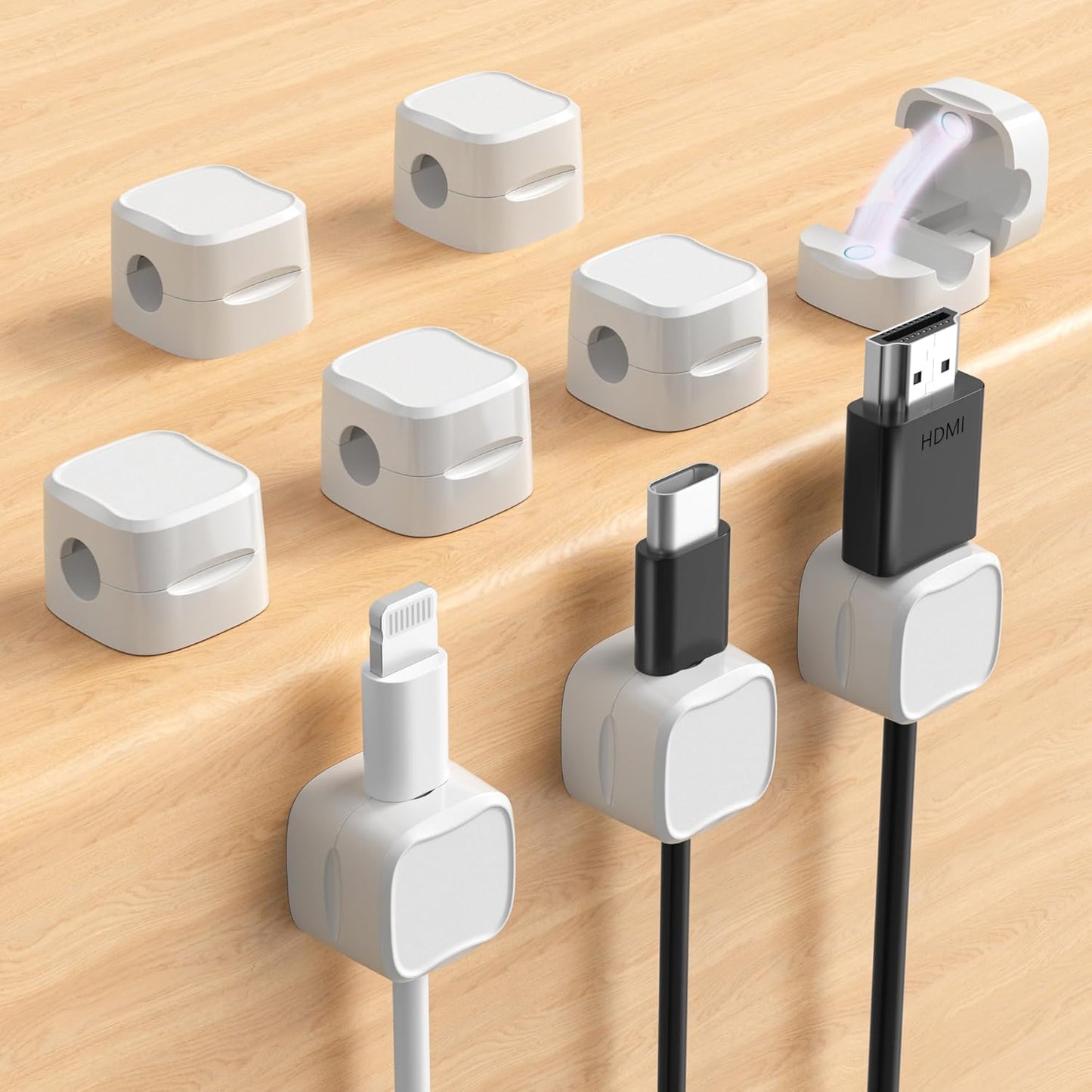
Cable Management Clips for Remote Work Desk — Magnetic Wire Holders for Laptop, Monitor and PC Setup, 9-Pack
Cable Management Clips for Remote Work Desk — Magnetic Wire Holders for Laptop, Monitor and PC Setup, 9-Pack
Couldn't load pickup availability
Why you'll love it
- Magnetic lock lets you pop a cable in or out in one second without yanking the organizer off the surface
- Pro PET adhesive removes cleanly with zero residue or paint damage on rented or wood surfaces
- One-size-fits-most 7.5mm opening covers virtually every cable type from HDMI to Lightning, reducing the need for multiple organizers
- Multicolor and crystal finishes let users match the clips to room decor instead of hiding ugly black plastic
- Multi-pack value (8 or 9 clips) lets a buyer organize an entire home or office in one purchase
- Tiny 0.79-inch footprint keeps the clip itself nearly invisible, supporting a minimalist look
Perfect for
- Route and hold Type-C, Lightning, HDMI and USB charging cables along desk edges so they never slip to the floor
- Secure PC power, network, mouse and keyboard cables behind a workstation for a clean battlestation
- Mount a charging cable on the car dashboard for easy one-handed phone plug-in while driving
- Tame headphone and earbud cords on a nightstand so they're grab-and-go in the morning
- Stick to walls, glass or ceramic tiles to keep kitchen-appliance cords neat and off countertops


Product Information
Hold Most Cords: Diameter of about 0.3 inch (7.5mm) allows to hold most cords, such as Type-C charger cords, lightning cords, HDMI cords, USB cables, PC Notebook power wires, network wires, mouse cords, keyboard cables, headphone cords Magnetic Locking & No Falling Off: Secure magnetic grasp opening and closing allow easy cord in,and powerful magnetic lock the organizer firmly to hold any charging head without falling off, more convenient to pull the cables out for smoothly using No-Residue or Damage: Strong Pro PET sticky pad ensures the intension of adhesiveness and avoid any adhesive residue or surface damage when removed,perfect stick firmly to any smooth and dry surface,wooden,table, glass, or ceramic tiles Makes Your Cables Organized: COOCAT cable Organizer could hold cables in place firmly and keep them off the floor. More importantly, it allows you to keep cords toward neat traces as you wish, such as setting them on the office desktop, tableside, table corner, wall, or car dashboard Kindly Installation Tips: Please clean the desired surface without dust before sticking, and keep pressing for 30 seconds to enhance the adhesion of the sticky pad. Highly recommend waiting for 12-24 hours for better use
Product Dimensions 0.79 x 0.79 x 0.67 inches Item Weight 2.08 ounces
Frequently Asked Questions
Will these magnetic cable clips actually help me focus better during deep work sessions?
Yes — by keeping charging and data cables pinned to the edge of your desk, the clips remove the small but constant visual noise of tangled cords, helping you enter and stay in a focused state without micro-distractions.
Do they hold thick monitor and laptop charger cables without slipping during a long workday?
The 7.5mm opening fits most laptop chargers, monitor power cords and USB-C charging cables, and the magnetic clasp locks the plug end firmly in place, so cables stay put through full workdays.
Can I use these on a standing desk that I raise and lower throughout the day?
Yes. The Pro PET adhesive bonds securely to smooth desktop surfaces like wood, glass and laminate, and the clip body sits flush so it does not catch on anything as the desk moves up and down.
Will the cable clips help me set up a clean background for video calls?
Absolutely. Routing your charger, webcam and microphone cables behind the desk edge keeps the camera-facing surface uncluttered, giving you a more professional and distraction-free video call backdrop.
Do they reduce the time I spend hunting for the right charging cable each morning?
Yes. Each cable lives in its own designated clip at the desk edge, so you can grab the exact cable you need in one second instead of untangling a pile at the start of your shift.
I split my week between home and a co-working space — are these clips good for both?
Yes. The adhesive removes cleanly with no residue, so you can apply them at your home desk during remote days and re-stick them on the co-working hot desk on in-office days without damaging either surface.
Is the 8-pack enough clips to organize an entire home office setup?
For most single-desk setups you only need 3 to 5 clips, so an 8-pack easily covers a desk, monitor, laptop charger and still leaves extras for your phone charging spot or headset stand.
Will the multicolor crystals look too playful for a serious professional workspace?
Not at all. The clips are only 0.79 inches wide, so they read as subtle accents rather than toys, and the crystal finish catches light in a refined way that blends with both modern and traditional office decor.
How do magnetic cable clips compare to traditional adhesive cord holders for a work desk?
Traditional holders use a friction groove that you have to thread the entire cable through, which makes swapping cables slow. The magnetic clasp opens with one finger, so you can swap a Lightning cable for a USB-C in a second without unmounting the clip.
Are these better than a full cable management tray mounted under the desk?
Under-desk trays are great for power strips but do not help with the cables you actually plug into every day. These clips handle the high-frequency charging and data cables at desk level, so they solve a different problem and work well alongside a tray.
Compared to cable sleeves, do magnetic clips let me access individual cords faster?
Yes. A sleeve bundles all cables into one tube, which means you have to pull the whole bundle out to disconnect a single cord. Magnetic clips keep every cable individually accessible while still looking tidy.
Will the adhesive actually stay stuck during long video meetings where my cables get tugged?
Yes. The Pro PET adhesive is engineered for a strong hold on smooth surfaces, and the magnetic clasp absorbs small tugs so the cable moves slightly instead of yanking the clip off the desk.
I'm worried the clips will look cheap and ruin my otherwise premium desk aesthetic — will they?
The compact 0.79-inch housing and crystal or matte finishes are designed to read as small design objects rather than plastic hardware, and many customers place them on the back edge of the desk where they are barely visible during work.
What if my home office desk is rented and I cannot damage the surface?
The Pro PET adhesive is specifically chosen because it removes cleanly from wood, glass and most painted surfaces with zero residue, making it safe for rented apartments, dorms and leased office space.
Do the clips get in the way when I slide my laptop back and forth on the desk?
No. With a 0.67-inch height, the clips sit low enough that your laptop or monitor base glides right over them, so they do not interrupt your normal typing or sliding motion.
Will the magnetic clasp weaken over time and start dropping my cables mid-workday?
No. The magnetic lock is rated for repeated daily use, and because there is no spring or moving plastic hinge, there is no wear part to fail, so the hold stays consistent over months of use.
How do I install the magnetic cable clip on a desk, wall or dashboard?
Wipe the surface clean and dry, peel off the protective film from the Pro PET adhesive pad, press the clip firmly onto the surface for 10 to 15 seconds, then wait 24 hours before loading a cable for the strongest bond.
How do I insert and remove a cable from the magnetic clip?
Use one finger to lift the magnetic clasp open, slide the cable end into the 7.5mm opening, and let the magnet snap shut. To remove, lift the clasp again and pull the cable out — no yanking or threading required.
How do I remove the clip later without damaging the surface?
Slowly peel the clip off at a low angle, or use a bit of warm air from a hair dryer to soften the adhesive. The Pro PET pad releases cleanly from wood, glass, ceramic tile and most painted surfaces with no residue.
Will these magnetic clips fit my USB-C, Lightning, HDMI and USB cables?
Yes. The 7.5mm inner diameter is designed as a one-size-fits-most opening that accommodates Type-C, Lightning, Micro-USB, full-size HDMI, USB-A, network, mouse, keyboard and standard 3.5mm headphone cables.
Do the clips work on curved or textured surfaces like a car dashboard?
They adhere best to smooth, flat, dry surfaces such as glass, ceramic tile, finished wood and the flat sections of a car dashboard. On heavily textured or curved panels the bond will be weaker and the clip may need to be remounted periodically.
What is included in the box and do I need to buy anything separately?
The box includes either 8 or 9 magnetic cable clips with pre-applied Pro PET adhesive pads, ready to mount. No additional tools, adhesives or accessories are required.
Are the magnets safe to use around phones, laptops and hard drives?
Yes. The magnet is small and localized to the clasp, and it does not interfere with the operation of smartphones, tablets, laptops, wireless chargers or modern solid-state storage in normal use.
How strong is the magnetic hold — will my cable fall out if the desk gets bumped?
The magnetic clasp is engineered to snap firmly around the cable end and hold it through normal desk bumps, light tugs and vibrations in a car. Very heavy cables hanging straight down at a sharp angle may slip, so mount the clip with the cable running along the surface for best results.
What is the difference between a magnetic cable clip and a regular adhesive cable clip?
A regular adhesive clip uses a friction groove that you must thread the entire cable through, which makes swapping cables slow and can wear out the cable. A magnetic clip opens with one finger, so you can pop a cable in or out in a second without unmounting the organizer.